Over 25,000 workplaces use GroupGreeting to celebrate team milestones, and office managers often ask whether the platform can design or host custom-branded cards for their company. Yes, GroupGreeting supports both Custom Cover Uploads and Company Plan Logo Branding, along with a bespoke custom design service for organizations that want original artwork. With Custom Cover Uploads, you can swap any card front for your own 440px by 550px graphic or 50-frame animated GIF in 60 seconds. With Company Plan Logo Branding, your logo appears automatically below finished cards across shared accounts for up to 100 team members. Use Custom Cover Uploads for one-off team celebrations that call for a specific photo or in-house graphic, and choose Company Plan Logo Branding when HR and operations leads need consistent corporate branding on recurring workplace cards.
Quick verdict on which GroupGreeting customization option fits your team
You do not need a graphic designer on standby to make a digital card look like it came from your company. Most teams on GroupGreeting's digital card platform fall into one of three buckets depending on how often they send cards and whether they have artwork ready.
- Best for one-off celebrations or using in-house artwork: Custom Cover Uploads let you replace any card front with your own image or GIF on a single card for $4.99 USD + tax or as part of an active plan.
- Best for consistent corporate branding across departments: Company Plan Logo Branding stamps your company logo beneath finished cards and supports bulk card creation across shared team seats.
- Best for organizations wanting original artwork built from scratch: GroupGreeting's bespoke custom design service pairs with the platform's library of artist-designed cards when you want something made specifically for your brand.
Picking the right path comes down to control versus automation. If you want a hilarious photo of your engineering team on the front of a farewell card, uploading a custom cover takes less than a minute. If you manage recognition for a 200-person hybrid office and want every department lead to send cards with your brand mark at the bottom, a Company Plan removes the manual work.
How each branding and custom design option works
GroupGreeting built GroupGreeting's digital ecard platform so busy coordinators can stop chasing paper folders around the office and still deliver something personal. According to GroupGreeting's story and mission, anyone can set up a card in 60 seconds and share the signing link by email or text. Once you start a card, you have three distinct ways to customize how it looks for your team or clients.
Custom cover uploads: use your own artwork, team photo, or animated GIF
Every card on GroupGreeting includes an "Upload my own" option right on the customization screen. Whether you start from a birthday template, a welcome card, or a sympathy note, you can replace the default cover illustration with your own PNG, JPG, or animated GIF.
This works well for internal jokes, company retreat photos, or custom event graphics made in Canva or Figma. You can even update the cover later inside Card Settings if your marketing team sends over a cleaner file before the delivery date. For more tips on mixing visuals inside the card itself, see our guide on how to personalize digital group cards with photos and GIFs.
Company plan logo branding: automatic logo placement and multi-user accounts
Company Plans handle branding at the account level rather than card by card. Per the GroupGreeting FAQ, an account admin uploads the company logo once by going to Account Settings and selecting Upload Logo.
From that point on, your logo sits neatly below every finished card once the scheduled delivery time passes. Company plans also let you assign users and create online group cards in bulk, which saves hours during busy seasons like Administrative Professionals' Day or year-end holidays.
Bespoke custom card design vs the artist-designed library
Some organizations want a completely original card illustration created for a major milestone, such as a company anniversary or a client appreciation campaign. Alongside its library of thousands of artist-designed cards, GroupGreeting offers a bespoke custom design service for companies seeking tailored artwork.
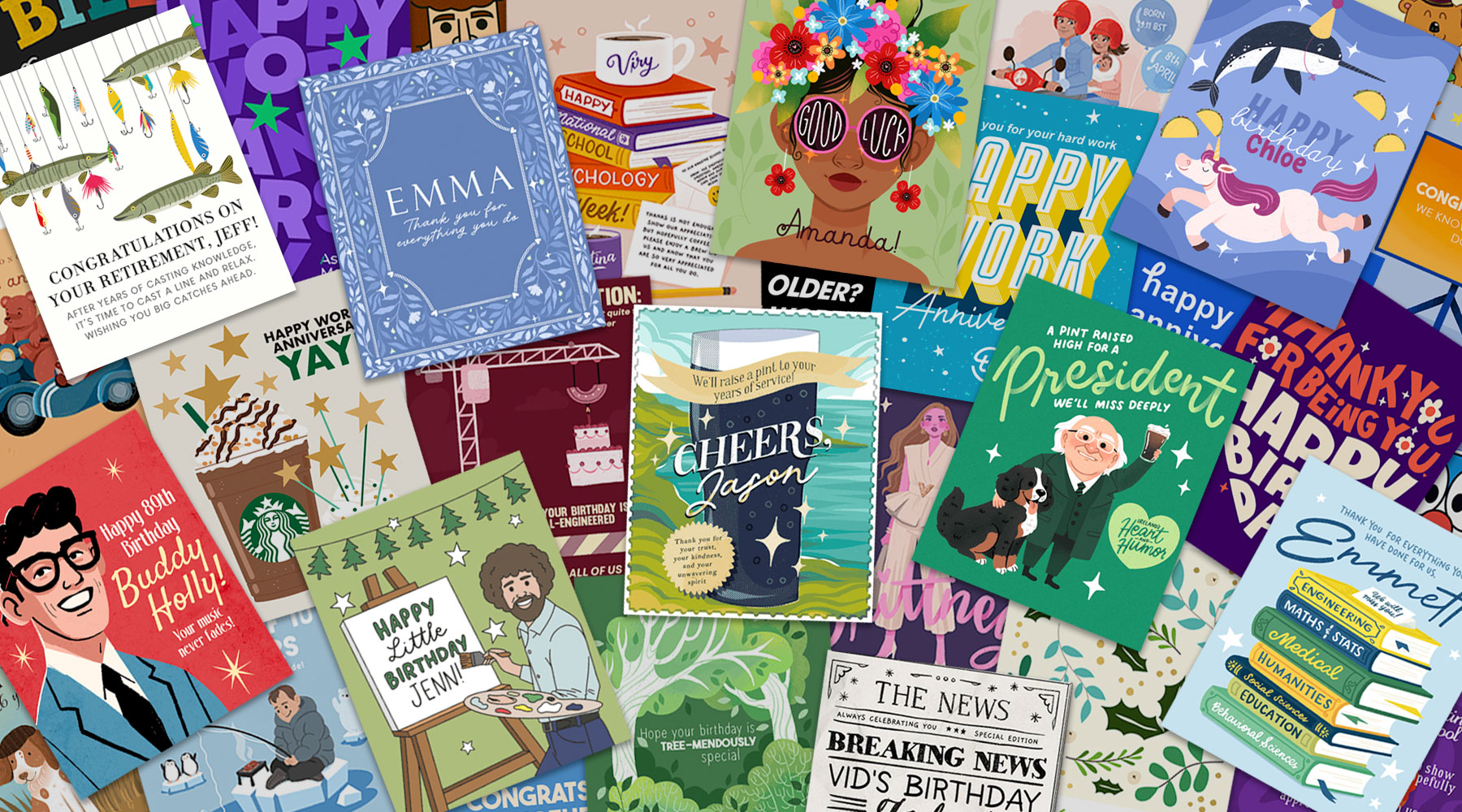
Before commissioning a custom illustration, check whether an existing template already fits the occasion. GroupGreeting's catalog spans over 10,000 designs created by artists around the world, covering everything from retirement jokes to formal customer thank-yous. You can still attach your company logo below any of those templates through a Company Plan, giving you a polished, branded result without waiting on a custom design cycle.
Side-by-side comparison: custom cover uploads vs company logo branding
Choosing between these two features is easier when you look at where the branding sits, who manages it, and what files you need. The table below breaks down how Custom Cover Uploads and Company Plan Logo Branding stack up for workplace teams.
| Factor | Custom Cover Upload | Company Plan Logo Branding | Best For |
|---|---|---|---|
| Replaces front cover artwork | ✓ | ✗ | Custom event graphics or team photos |
| Displays logo below finished card | ✗ | ✓ | Consistent corporate identity |
| Available on single $4.99 cards | ✓ | ✗ | Occasional senders |
| Requires a Company Plan | ✗ | ✓ | HR, People Ops, and multi-department teams |
| Supports animated GIFs | ✓ (up to 50 frames) | ✗ | Playful internal celebrations |
| Shared multi-user access (up to 100) | ✗ (single-account unless on plan) | ✓ | Distributed offices with multiple managers |
| Supports bulk card creation | ✗ | ✓ | Large-scale work anniversaries and holidays |
File specifications and animation limits
Custom Cover Uploads have strict dimensions so your artwork renders crisply on every screen without awkward cropping. Your uploaded image must measure exactly 440px wide by 550px high, and the file size cannot exceed 5MB.
If you want movement on the cover, GroupGreeting supports animated GIFs as long as the file consists of 50 frames or less. Keeping your GIF under that 50-frame ceiling keeps load times fast for remote coworkers opening the card on mobile devices or slower connections.
Where the branding appears on the recipient's card
With a Custom Cover Upload, your graphic becomes the first thing the recipient sees when they open their card link. It completely replaces the stock cover illustration, while the inside pages remain open for unlimited coworker messages, photos, and GIFs.
Company Plan Logo Branding takes a subtler approach. Your company logo appears below the finished card after the scheduled delivery time has passed. That placement keeps the celebratory cover artwork front and center while still tying the gesture back to your organization.
Multi-user controls and bulk card creation
Single-card purchases work fine when one office manager handles every birthday. Once multiple department leads start sending cards, sharing logins becomes messy fast.
On a Company Plan, admins can invite up to 100 additional users through the Subscription tab under User Management. Every team member gets their own private login and password, so admins cannot read a manager's private cards and managers cannot see each other's drafts. Admins can track how many cards each person has used and set individual sending caps, while all cards draw from the shared plan allotment.
Pricing and plan structure for custom and branded cards
Budgeting for workplace recognition is straightforward on GroupGreeting because the platform separates pay-per-card pricing from annual team allotments. You can review current tiers on GroupGreeting's Pricing page, and the comparison below outlines how each option works.
| Option | Pricing Structure | Custom Cover Uploads | Company Logo Branding | Team Sharing |
|---|---|---|---|---|
| Pay-Per-Card | $4.99 USD + tax per card | ✓ | ✗ | Single sender |
| Company Plan | Annual card allotment (see pricing page) | ✓ | ✓ | Up to 100 users |
| Plan Overage | $5.99 per extra card or buy a new plan | ✓ | ✓ | Shared plan users |
A few practical rules apply when you manage a Company Plan over a full calendar year. Unused cards do not roll over to the next year, so estimate your annual headcount and milestone volume before locking in a tier. If your team runs out of cards mid-year, you can either pay $5.99 for each extra card individually or purchase a new plan.
Plan holders also get access to a clone feature that lets you send the exact same card and its existing entries to multiple recipients. You can even attach a gift card inside any GroupGreeting card to make a work anniversary or retirement feel extra memorable. On top of that, every online card purchase funds tree planting through OneTreePlanted, which has helped plant 207,968 trees so far. For a deeper look at buying software for larger teams, check out our guide on how to evaluate Business and Enterprise software plans for your team.
Which customization path should your workplace choose?
Different teams have different bottlenecks. A 15-person startup rarely has the same workflow as a global enterprise sending cards across 195 countries. Here is how to match GroupGreeting's features to your actual setup.
Choose custom cover uploads if your team wants one-off creative control
Pick Custom Cover Uploads when the occasion calls for something hyper-specific to your crew. A team photo from your last offsite, a custom illustration of a retiring colleague's dog, or an inside joke turned into a 440px by 550px graphic will always beat a generic card.
This option works across both group formats and individual notes. You can upload custom covers when sending from GroupGreeting's huge selection of group birthday card designs or when sending 1 to 1 personal cards from a manager to a direct report.
Choose company plan logo branding if you manage recurring workplace milestones
Pick Company Plan Logo Branding when consistency matters more than custom illustration on every card. HR managers and People Ops leads use this path for automated onboarding welcomes, work anniversaries, and external client thank-yous.
Uploading your logo once in Account Settings means every department lead sends on-brand cards without bugging your design team. As highlighted in GroupGreeting's press coverage, organizations switching from paper cards to digital workflows appreciate cutting out printing and postage while keeping their brand identity intact.

When to start with the template library instead
You do not have to build custom artwork to send a thoughtful card. If you have zero design bandwidth and need a card ready in the next five minutes, start with GroupGreeting's pre-designed workplace catalog.
Templates like Happy Birthday to Our CEO, Welcome to the Best Team, and Thank You For Being Our Customer are built specifically for corporate milestones. You get artist-made typography and illustration out of the box, and if you are on a Company Plan, your company logo still appears cleanly below the card.
Final recommendation and how to set up your first branded card
The strongest setup for most growing companies is combining both options. Start a Company Plan so your logo appears automatically on every card and up to 100 managers can share the allotment, then use Custom Cover Uploads whenever a major milestone deserves a bespoke graphic or team photo.
Setting up your first branded card takes about 60 seconds:
- Choose a Company Plan on GroupGreeting Pricing if you want logo branding and multi-user seats, or pick a single card from GroupGreeting's ecard library to start right away.
- If you are on a Company Plan, open Account Settings, click Upload Logo, and add your company mark so it displays below finished cards.
- Select a card template, or click "Upload my own" to drop in a 440px by 550px image or a 50-frame GIF under 5MB.
- Enter the recipient's details, share the signing link with your team, and turn on notifications to track signatures and confirm when the recipient opens the card.
GroupGreeting has delivered over 5 million cards and 90 million messages of appreciation across 195 countries, and getting your first branded card ready is the fastest way to see how it fits your team. Visit GroupGreeting to test a custom cover upload or set up a Company Plan for your workplace today.